> For the complete documentation index, see [llms.txt](https://docs.bloombot.app/llms.txt). Markdown versions of documentation pages are available by appending `.md` to page URLs; this page is available as [Markdown](https://docs.bloombot.app/evm/basics/getting-started-new/commands-and-links.md).
# Commands and Links
{% hint style="info" %}
Commands open a screen of the bot, and Bloom links open the bot on a given screen. You can also paste a token address or search a ticker.
{% endhint %}
## Commands
Send each command on its own. A command or a menu button closes any question the bot is waiting on.
| Command | Action |
| -------------- | -------------------------------------------------------------------------------------------------------------- |
| `/start` | Starts sign-up if you have no account, otherwise opens Home. |
| `/home` | Opens Home. |
| `/positions` | Opens the tokens you hold. |
| `/copy` | Opens your Copy Trade tasks. |
| `/afk` | Opens your AFK tasks. |
| `/social` | Opens your Social tasks. `/twitter` opens the same screen. |
| `/orders` | Opens your limit orders. |
| `/settings` | Opens a list of chains, each with its own settings. |
| `/wallets` | Opens your wallets. |
| `/withdraw` | Opens Withdraw. |
| `/bridge` | Opens Bridge. |
| `/referral` | Opens your referral link and rewards. |
| `/calendar` | Opens the PnL Calendar. |
| `/suggestions` | Opens your suggestions to Bloom. |
| `/scanner` | Checks an Ethereum token contract for risks, taking the address after the command or when the bot asks for it. |
| `/gas` | Asks for a gas price in gwei and shows what a typical transaction costs on several chains. |
| `/recover` | Moves coins left on other networks from one of your wallets to another. |
## Bloom Links
A Bloom link opens the bot on a given screen.
| Link | Action |
| --------------------------------------------------------- | ------------------------------------------------------------------------------------------------- |
| Referral link, on **👥 Referrals** | Starts sign-up and saves the code as your referrer, or opens Home if you already have an account. |
| Token link shared outside the bot | Opens the token panel, ready to buy. |
| **🤑 Share Token & Earn**, on a token panel | A token link that carries your referral code, also used by the Bloom extension buttons. |
| Token names on **💼 Positions** and in ticker results | Opens the token panel, ready to sell. |
| **SELL** links such as **SELL 100%**, on **💼 Positions** | Sell that share of the token at once from every **Spot** wallet, with no confirmation. |
| Per-wallet **SELL** links on a token panel | Sell that share at once from that one wallet, with no confirmation. |
| **📝 Limit Orders: 2** on a token panel | Opens your limit orders for that token. |
| Copy link | Creates a Copy Trade task, switched off, that copies the wallet in the link. |
| Discord link from Bloom's Discord server | Links your Discord account to your Bloom account for Bloom Discord roles. |
{% hint style="warning" %}
SELL links sell at once, with no confirmation.
{% endhint %}
## Pasting a Token Address
Paste a message that holds a token address and the bot opens its token panel.
1. Copy a token's address (its contract address), or a link that contains it, such as an explorer, DexScreener or GMGN link.
2. Paste it into the chat with the bot and send it.
The panel opens on the chain where the token has the most liquidity. ⬅️ and ➡️ on the panel switch it to another chain. See [Chains](https://docs.bloombot.app/evm/basics/getting-started-new/chains.md).
{% hint style="warning" %}
With **Degen Mode** on, pasting a token address buys the token at once.
{% endhint %}
## Searching by Ticker
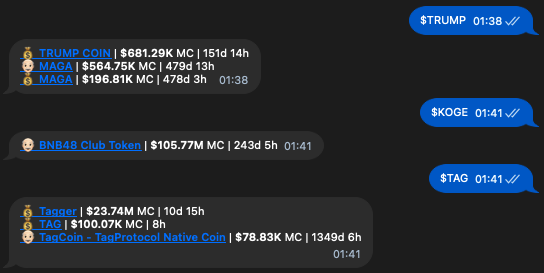
Send `$` and a token symbol, for example `$TICKER`. The bot lists matching tokens on BSC only, with their market cap and age. Tap a token name to open its panel.
---
# Agent Instructions
This documentation is published with GitBook. GitBook is the documentation platform designed so that both humans and AI agents can read, navigate, and reason over technical content effectively. Learn more at gitbook.com.
## Querying This Documentation
If you need additional information that is not directly available in this page, you can query the documentation by asking a question.
Perform an HTTP GET request on the following URL with the `ask` and `goal` query parameters:
```
GET https://docs.bloombot.app/evm/basics/getting-started-new/commands-and-links.md?ask=&goal=
```
`ask` is the immediate question: it should be specific, self-contained, and written in natural language.
`goal` is what the user is ultimately trying to achieve, the reason they need the answer. Sharing it helps GitBook give you a better, more relevant answer. A goal is most helpful when it describes the outcome the user wants rather than restating the question. For example, with `ask=how do I create an API token`, a goal like `automate deployments from our CI pipeline` lets GitBook tailor the answer to that use case.
The response will contain a direct answer to the question and relevant excerpts and sources from the documentation.
Use this mechanism when the answer is not explicitly present in the current page, you need clarification or additional context, or you want to retrieve related documentation sections.