Copy
Setup
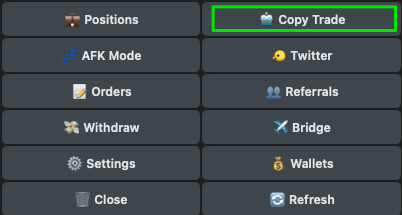
Access the
🤖 Copy Trademenu directly by using the/copycommand or from the/startmenu.


Blockchain Selector
Use the arrow to select the appropriate target blockchain.
Add new config
Add a new wallet for copy-trading.
Mass Create
Bulk create or import copy-trading target addresses.
Pause All
Pause all active copy-traded wallets.
Start All
Start copy-trading with all active wallets.
Delete All
Delete all copy-trading configurations.
Back
Return to the previous page.
Close
Close the current menu.
Access the
🤖 Copy Trademenu directly by using the/copycommand or from the/startmenu.


Blockchain Selector
Use the arrow to select the appropriate target blockchain.
Add new config
Add a new wallet for copy-trading.
Mass Create
Bulk create or import copy-trading target addresses.
Pause All
Pause all active copy-traded wallets.
Start All
Start copy-trading with all active wallets.
Delete All
Delete all copy-trading configurations.
Back
Return to the previous page.
Close
Close the current menu.
Access the
🤖 Copy Trademenu directly by using the/copycommand or from the/startmenu.


Blockchain Selector
Use the arrow to select the appropriate target blockchain.
Add new config
Add a new wallet for copy-trading.
Mass Create
Bulk create or import copy-trading target addresses.
Pause All
Pause all active copy-traded wallets.
Start All
Start copy-trading with all active wallets.
Delete All
Delete all copy-trading configurations.
Back
Return to the previous page.
Close
Close the current menu.
Access the
🤖 Copy Trademenu directly by using the/copycommand or from the/startmenu.


Blockchain Selector
Use the arrow to select the appropriate target blockchain.
Add new config
Add a new wallet for copy-trading.
Mass Create
Bulk create or import copy-trading target addresses.
Pause All
Pause all active copy-traded wallets.
Start All
Start copy-trading with all active wallets.
Delete All
Delete all copy-trading configurations.
Access the
🤖 Copy Trademenu directly by using the/copycommand or from the/startmenu.


Blockchain Selector
Use the arrow to select the appropriate target blockchain.
Add new config
Add a new wallet for copy-trading.
Mass Create
Bulk create or import copy-trading target addresses.
Pause All
Pause all active copy-traded wallets.
Start All
Start copy-trading with all active wallets.
Delete All
Delete all copy-trading configurations.
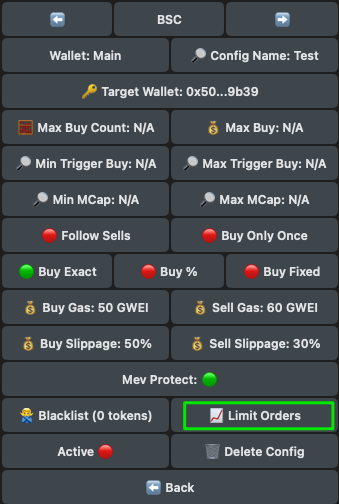
Add New Config
After clicking 🆕 Add new config, you’ll be requird to enter:
Target address you'd like to copy-trade:
Please enter your desired target address:Desired config name:
Please choose a name for this config:
Once you’ve entered the details above, you’ll be prompted to the config menu.

Blockchain Selector
Use the arrow to select the appropriate target blockchain.
Wallet
Switch wallet to copy-trade with.
Config Name
Rename the current configuration.
Target Wallet
Set the wallet you wish to copy-trade.
First Interaction
🟢: If enabled, it will trigger trades only when the trader you’re copy-trading interacts with the token for the first time 🔴: If disabled, the bot will not consider whether the trader has previously interacted with the token or not. First Interaction considers trades made on or after September 22 2025. Due to EVM’s structural limitations, any trades executed before that date are not included.
Sell Only Copied Buys
Sells trigger only for tokens bought via copytrading, excluding Spot, Twitter and AFK purchases.
Max Buy Count
Set the maximum number of coins the bot will purchase according to your current configuration.
Current Trades
Show how many times your configuration has bought that token.
Max Per Token
Set how many times you want to buy the same token.
Reset Count
Resets the number of times your configuration has bought that token.
Max Buy
Set the maximum amount you’re willing to buy, regardless of the amount purchased by the target wallet. Max Buy applies to each transaction.
Min Trigger
Set the minimum BNB amount purchased by the target wallet required for your transaction to be executed.
Max Trigger
Set the maximum BNB amount purchased by the target wallet required for your transaction to be executed.
Min MCap
Set the minimum market cap you are willing to buy at.
Max MCap
Set the maximum market cap you are willing to buy at.
Min Token Age
• Set the minimum amount of time passed since the token was created. • For Pump.fun migrated coins, the time is calculated from the moment they bonded. Disclaimer: Only trades from Sept 22, 2025 onward are included. Older trades are excluded due to EVM limits.
Reverse Mode
Purchases are triggered exclusively when the target wallet sells.
Buy transactions from the target wallet are ignored. Reverse Mode Min Sell: Set the minimum percentage the target wallet must sell to trigger the task.
Max Token Age
• Set the maximum amount of time passed since the token was created. • For Pump.fun migrated coins, the time is calculated from the moment they bonded. Disclaimer: Only trades from Sept 22, 2025 onward are included. Older trades are excluded due to EVM limits.
Follow Sell
Choose whether to sell when the target wallet sells.
When enabled, the bot will mirror the selling percentage of the trader - for example, if they sell 50% of their position, the bot will also sell 50% of your position
Fixed Sell
Enter the % you want to sell when the target address sells any amount.
Buy Only Once
Buy the coin only once, even if the target wallet makes multiple purchases. If you’re using multiple wallets, ensure it’s turned ON for each one.
Buy Exact
Buy the same BNB amount as the target wallet.
Buy %
Buy a percentage of the amount the target wallet buys. You can set it above 100% to purchase more than the target wallet (eg. 130% buys an additional 30% of the amount purchased by the target wallet).
Buy Fixed
Buy a fixed BNB amount, regardless of the target wallet’s amount.
Buy Gas
Set the transaction gas (Max Priority Fee) for buying. Max Fee is automatically calculated using the formula: Base Fee + (Priority Fee × 2).
Sell Gas
Set the transaction gas (Max Priority Fee) for selling. Max Fee is automatically calculated using the formula: Base Fee + (Priority Fee × 2).
Buy Slippage
Set the buy slippage percentage.
Sell Slippage
Set the sell slippage percentage.
Buy Tip
Set the tip to increase transaction priority and help your trade execute faster.
Sell Tip
Set the tip to increase transaction priority and help your trade execute faster.
Mev Protect
When MEV Protect is enabled, your transactions will be processed through BloXroute to prevent getting MEVed. If disabled, transactions will be routed through the custom node.
Blacklist
Exclude specific addresses from copy-trading.
Limit Orders
Active
After clicking 🆕 Add new config, you’ll be requird to enter:
Target address you'd like to copy-trade:
Please enter your desired target address:Desired config name:
Please choose a name for this config:
Once you’ve entered the details above, you’ll be prompted to the config menu.

Blockchain Selector
Use the arrow to select the appropriate target blockchain.
Wallet
Switch wallet to copy-trade with.
Config Name
Rename the current configuration.
Target Wallet
Set the wallet you wish to copy-trade.
First Interaction
🟢: If enabled, it will trigger trades only when the trader you’re copy-trading interacts with the token for the first time 🔴: If disabled, the bot will not consider whether the trader has previously interacted with the token or not. First Interaction considers trades made on or after September 22 2025. Due to EVM’s structural limitations, any trades executed before that date are not included.
Sell Only Copied Buys
Sells trigger only for tokens bought via copytrading, excluding Spot, Twitter and AFK purchases.
Max Buy Count
Set the maximum number of coins the bot will purchase according to your current configuration.
Current Trades
Show how many times your configuration has bought that token.
Max Per Token
Set how many times you want to buy the same token.
Reset Count
Resets the number of times your configuration has bought that token.
Max Buy
Set the maximum amount you’re willing to buy, regardless of the amount purchased by the target wallet. Max Buy applies to each transaction.
Min Trigger
Set the minimum ETH amount purchased by the target wallet required for your transaction to be executed.
Max Trigger
Set the maximum ETH amount purchased by the target wallet required for your transaction to be executed.
Min MCap
Set the minimum market cap you are willing to buy at.
Max MCap
Set the maximum market cap you are willing to buy at.
Min Token Age
• Set the minimum amount of time passed since the token was created. • For Pump.fun migrated coins, the time is calculated from the moment they bonded. Disclaimer: Only trades from Sept 22, 2025 onward are included. Older trades are excluded due to EVM limits.
Reverse Mode
Purchases are triggered exclusively when the target wallet sells.
Buy transactions from the target wallet are ignored. Reverse Mode Min Sell: Set the minimum percentage the target wallet must sell to trigger the task.
Max Token Age
• Set the maximum amount of time passed since the token was created. • For Pump.fun migrated coins, the time is calculated from the moment they bonded. Disclaimer: Only trades from Sept 22, 2025 onward are included. Older trades are excluded due to EVM limits.
Follow Sell
Choose whether to sell when the target wallet sells.
When enabled, the bot will mirror the selling percentage of the trader - for example, if they sell 50% of their position, the bot will also sell 50% of your position
Fixed Sell
Enter the % you want to sell when the target address sells any amount.
Buy Only Once
Buy the coin only once, even if the target wallet makes multiple purchases. If you’re using multiple wallets, ensure it’s turned ON for each one.
Buy Exact
Buy the same ETH amount as the target wallet.
Buy %
Buy a percentage of the amount the target wallet buys. You can set it above 100% to purchase more than the target wallet (eg. 130% buys an additional 30% of the amount purchased by the target wallet).
Buy Fixed
Buy a fixed ETH amount, regardless of the target wallet’s amount.
Buy Gas
Set the transaction gas (Max Priority Fee) for buying. Max Fee is automatically calculated using the formula: Base Fee + (Priority Fee × 2).
Sell Gas
Set the transaction gas (Max Priority Fee) for selling. Max Fee is automatically calculated using the formula: Base Fee + (Priority Fee × 2).
Buy Slippage
Set the buy slippage percentage.
Sell Slippage
Set the sell slippage percentage.
Buy Tip
Set the tip to increase transaction priority and help your trade execute faster.
Sell Tip
Set the tip to increase transaction priority and help your trade execute faster.
Mev Protect
When MEV Protect is enabled, your transactions will be processed through BloXroute to prevent getting MEVed. If disabled, transactions will be routed through the custom node.
Blacklist
Exclude specific addresses from copy-trading.
Limit Orders
Active
After clicking 🆕 Add new config, you’ll be requird to enter:
Target address you'd like to copy-trade:
Please enter your desired target address:Desired config name:
Please choose a name for this config:
Once you’ve entered the details above, you’ll be prompted to the config menu.

Blockchain Selector
Use the arrow to select the appropriate target blockchain.
Wallet
Switch wallet to copy-trade with.
Config Name
Rename the current configuration.
Target Wallet
Set the wallet you wish to copy-trade.
First Interaction
🟢: If enabled, it will trigger trades only when the trader you’re copy-trading interacts with the token for the first time 🔴: If disabled, the bot will not consider whether the trader has previously interacted with the token or not. First Interaction considers trades made on or after September 22 2025. Due to EVM’s structural limitations, any trades executed before that date are not included.
Sell Only Copied Buys
Sells trigger only for tokens bought via copytrading, excluding Spot, Twitter and AFK purchases.
Max Buy Count
Set the maximum number of coins the bot will purchase according to your current configuration.
Current Trades
Show how many times your configuration has bought that token.
Max Per Token
Set how many times you want to buy the same token.
Reset Count
Resets the number of times your configuration has bought that token.
Max Buy
Set the maximum amount you’re willing to buy, regardless of the amount purchased by the target wallet. Max Buy applies to each transaction.
Min Trigger
Set the minimum ETH amount purchased by the target wallet required for your transaction to be executed.
Max Trigger
Set the maximum ETH amount purchased by the target wallet required for your transaction to be executed.
Min MCap
Set the minimum market cap you are willing to buy at.
Max MCap
Set the maximum market cap you are willing to buy at.
Min Token Age
• Set the minimum amount of time passed since the token was created. • For Pump.fun migrated coins, the time is calculated from the moment they bonded. Disclaimer: Only trades from Sept 22, 2025 onward are included. Older trades are excluded due to EVM limits.
Reverse Mode
Purchases are triggered exclusively when the target wallet sells.
Buy transactions from the target wallet are ignored. Reverse Mode Min Sell: Set the minimum percentage the target wallet must sell to trigger the task.
Max Token Age
• Set the maximum amount of time passed since the token was created. • For Pump.fun migrated coins, the time is calculated from the moment they bonded. Disclaimer: Only trades from Sept 22, 2025 onward are included. Older trades are excluded due to EVM limits.
Follow Sell
Choose whether to sell when the target wallet sells.
When enabled, the bot will mirror the selling percentage of the trader - for example, if they sell 50% of their position, the bot will also sell 50% of your position
Fixed Sell
Enter the % you want to sell when the target address sells any amount.
Buy Only Once
Buy the coin only once, even if the target wallet makes multiple purchases. If you’re using multiple wallets, ensure it’s turned ON for each one.
Buy Exact
Buy the same ETH amount as the target wallet.
Buy %
Buy a percentage of the amount the target wallet buys. You can set it above 100% to purchase more than the target wallet (eg. 130% buys an additional 30% of the amount purchased by the target wallet).
Buy Fixed
Buy a fixed ETH amount, regardless of the target wallet’s amount.
Buy Gas
Set the transaction gas (Max Priority Fee) for buying. Max Fee is automatically calculated using the formula: Base Fee + (Priority Fee × 2).
Sell Gas
Set the transaction gas (Max Priority Fee) for selling. Max Fee is automatically calculated using the formula: Base Fee + (Priority Fee × 2).
Buy Slippage
Set the buy slippage percentage.
Sell Slippage
Set the sell slippage percentage.
Buy Tip
Set the tip to increase transaction priority and help your trade execute faster.
Sell Tip
Set the tip to increase transaction priority and help your trade execute faster.
Mev Protect
When MEV Protect is enabled, your transactions will be processed through BloXroute to prevent getting MEVed. If disabled, transactions will be routed through the custom node.
Blacklist
Exclude specific addresses from copy-trading.
Limit Orders
Active
After clicking 🆕 Add new config, you’ll be requird to enter:
Target address you'd like to copy-trade:
Please enter your desired target address:Desired config name:
Please choose a name for this config:
Once you’ve entered the details above, you’ll be prompted to the config menu.

Blockchain Selector
Use the arrow to select the appropriate target blockchain.
Wallet
Switch wallet to copy-trade with.
Config Name
Rename the current configuration.
Target Wallet
Set the wallet you wish to copy-trade.
First Interaction
🟢: If enabled, it will trigger trades only when the trader you’re copy-trading interacts with the token for the first time 🔴: If disabled, the bot will not consider whether the trader has previously interacted with the token or not. First Interaction considers trades made on or after September 22 2025. Due to EVM’s structural limitations, any trades executed before that date are not included.
Sell Only Copied Buys
Sells trigger only for tokens bought via copytrading, excluding Spot, Twitter and AFK purchases.
Max Buy Count
Set the maximum number of coins the bot will purchase according to your current configuration.
Current Trades
Show how many times your configuration has bought that token.
Max Per Token
Set how many times you want to buy the same token.
Reset Count
Resets the number of times your configuration has bought that token.
Max Buy
Set the maximum amount you’re willing to buy, regardless of the amount purchased by the target wallet. Max Buy applies to each transaction.
Min Trigger
Set the minimum HYPE amount purchased by the target wallet required for your transaction to be executed.
Max Trigger
Set the maximum HYPE amount purchased by the target wallet required for your transaction to be executed.
Min MCap
Set the minimum market cap you are willing to buy at.
Max MCap
Set the maximum market cap you are willing to buy at.
Min Token Age
• Set the minimum amount of time passed since the token was created. • For Pump.fun migrated coins, the time is calculated from the moment they bonded. Disclaimer: Only trades from Sept 22, 2025 onward are included. Older trades are excluded due to EVM limits.
Reverse Mode
Purchases are triggered exclusively when the target wallet sells.
Buy transactions from the target wallet are ignored. Reverse Mode Min Sell: Set the minimum percentage the target wallet must sell to trigger the task.
Max Token Age
• Set the maximum amount of time passed since the token was created. • For Pump.fun migrated coins, the time is calculated from the moment they bonded. Disclaimer: Only trades from Sept 22, 2025 onward are included. Older trades are excluded due to EVM limits.
Follow Sell
Choose whether to sell when the target wallet sells.
When enabled, the bot will mirror the selling percentage of the trader - for example, if they sell 50% of their position, the bot will also sell 50% of your position
Fixed Sell
Enter the % you want to sell when the target address sells any amount.
Buy Only Once
Buy the coin only once, even if the target wallet makes multiple purchases. If you’re using multiple wallets, ensure it’s turned ON for each one.
Buy Exact
Buy the same HYPE amount as the target wallet.
Buy %
Buy a percentage of the amount the target wallet buys. You can set it above 100% to purchase more than the target wallet (eg. 130% buys an additional 30% of the amount purchased by the target wallet).
Buy Fixed
Buy a fixed HYPE amount, regardless of the target wallet’s amount.
Buy Gas
Set the transaction gas (Max Priority Fee) for buying. Max Fee is automatically calculated using the formula: Base Fee + (Priority Fee × 2).
Sell Gas
Set the transaction gas (Max Priority Fee) for selling. Max Fee is automatically calculated using the formula: Base Fee + (Priority Fee × 2).
Buy Slippage
Set the buy slippage percentage.
Sell Slippage
Set the sell slippage percentage.
Buy Tip
Set the tip to increase transaction priority and help your trade execute faster.
Sell Tip
Set the tip to increase transaction priority and help your trade execute faster.
Mev Protect
When MEV Protect is enabled, your transactions will be processed through BloXroute to prevent getting MEVed. If disabled, transactions will be routed through the custom node.
Blacklist
Exclude specific addresses from copy-trading.
Limit Orders
Active
After clicking 🆕 Add new config, you’ll be requird to enter:
Target address you'd like to copy-trade:
Please enter your desired target address:Desired config name:
Please choose a name for this config:
Once you’ve entered the details above, you’ll be prompted to the config menu.

Blockchain Selector
Use the arrow to select the appropriate target blockchain.
Wallet
Switch wallet to copy-trade with.
Config Name
Rename the current configuration.
Target Wallet
Set the wallet you wish to copy-trade.
First Interaction
🟢: If enabled, it will trigger trades only when the trader you’re copy-trading interacts with the token for the first time 🔴: If disabled, the bot will not consider whether the trader has previously interacted with the token or not. First Interaction considers trades made on or after September 22 2025. Due to EVM’s structural limitations, any trades executed before that date are not included.
Sell Only Copied Buys
Sells trigger only for tokens bought via copytrading, excluding Spot, Twitter and AFK purchases.
Max Buy Count
Set the maximum number of coins the bot will purchase according to your current configuration.
Current Trades
Show how many times your configuration has bought that token.
Max Per Token
Set how many times you want to buy the same token.
Reset Count
Resets the number of times your configuration has bought that token.
Max Buy
Set the maximum amount you’re willing to buy, regardless of the amount purchased by the target wallet. Max Buy applies to each transaction.
Min Trigger
Set the minimum BNB amount purchased by the target wallet required for your transaction to be executed.
Max Trigger
Set the maximum MON amount purchased by the target wallet required for your transaction to be executed.
Min MCap
Set the minimum market cap you are willing to buy at.
Max MCap
Set the maximum market cap you are willing to buy at.
Min Token Age
• Set the minimum amount of time passed since the token was created. • For Pump.fun migrated coins, the time is calculated from the moment they bonded. Disclaimer: Only trades from Sept 22, 2025 onward are included. Older trades are excluded due to EVM limits.
Reverse Mode
Purchases are triggered exclusively when the target wallet sells.
Buy transactions from the target wallet are ignored. Reverse Mode Min Sell: Set the minimum percentage the target wallet must sell to trigger the task.
Max Token Age
• Set the maximum amount of time passed since the token was created. • For Pump.fun migrated coins, the time is calculated from the moment they bonded. Disclaimer: Only trades from Sept 22, 2025 onward are included. Older trades are excluded due to EVM limits.
Follow Sell
Choose whether to sell when the target wallet sells.
When enabled, the bot will mirror the selling percentage of the trader - for example, if they sell 50% of their position, the bot will also sell 50% of your position
Fixed Sell
Enter the % you want to sell when the target address sells any amount.
Buy Only Once
Buy the coin only once, even if the target wallet makes multiple purchases. If you’re using multiple wallets, ensure it’s turned ON for each one.
Buy Exact
Buy the same MON amount as the target wallet.
Buy %
Buy a percentage of the amount the target wallet buys. You can set it above 100% to purchase more than the target wallet (eg. 130% buys an additional 30% of the amount purchased by the target wallet).
Buy Fixed
Buy a fixed MON amount, regardless of the target wallet’s amount.
Buy Gas
Set the transaction gas (Max Priority Fee) for buying. Max Fee is automatically calculated using the formula: Base Fee + (Priority Fee × 2).
Sell Gas
Set the transaction gas (Max Priority Fee) for selling. Max Fee is automatically calculated using the formula: Base Fee + (Priority Fee × 2).
Buy Slippage
Set the buy slippage percentage.
Sell Slippage
Set the sell slippage percentage.
Buy Tip
Set the tip to increase transaction priority and help your trade execute faster.
Sell Tip
Set the tip to increase transaction priority and help your trade execute faster.
Mev Protect
When MEV Protect is enabled, your transactions will be processed through BloXroute to prevent getting MEVed. If disabled, transactions will be routed through the custom node.
Blacklist
Exclude specific addresses from copy-trading.
Limit Orders
Active
Click
📈 Limit Orders.

Click
🆕 Create Limit Order.

Dev Sell
Choose whether to automatically sell the specified amount if the Dev sells any of their tokens. If enabled, the bot will ignore the set profit/loss percentage and only trigger a sale when the Dev sells.
🟢: Active
🔴: Inactive
Sell Amount
Set the % you would like to sell.
Please enter your desired amount:
Profit/Loss
Set take profit or stop loss. • 📈 Take Profit: Use positive values (e.g., +100% for 2x)
• 📉 Stop Loss: Use negative values (e.g., -50% for half)
Please enter your desired amount:
Sell Gas
Set the transaction gas (Max Priority Fee) for selling. Max Fee is automatically calculated using the formula: Base Fee + (Priority Fee × 2).
Please enter your desired amount:
Slippage
Set the buy slippage percentage.
Please enter your desired amount:
Back
Return to the previous menu without creating the order.
Create Order
Tap to create the order.
Delete Order
Deletes the target order.
![]()
Last updated