> For the complete documentation index, see [llms.txt](https://docs.bloombot.app/llms.txt). Markdown versions of documentation pages are available by appending `.md` to page URLs; this page is available as [Markdown](https://docs.bloombot.app/evm/evm-bot/settings/presets/spot-presets-auto-orders.md).
# Spot Presets • Auto Orders
{% hint style="info" %}
#### Setting up Auto Orders works the same on every supported blockchain.
Auto orders are limit orders automatically created after you buy a coin. They trigger based on your settings and don't require you to start them manually once created.
After creation, the task will automatically start post-buy. Make sure to delete it if you don't want it to run.
***
The guide below refers to BSC. The same logic applies to all supported blockchains, although buttons and available features may vary.
{% endhint %}
***
### How Auto Orders Work
Auto orders follow a two-step process: first you create a group, then you add individual auto orders inside that group.
1. **Create a Group:** Tap 🆕 Create Group to set up a new auto order group.
2. **Create Auto Orders:** Inside each group, tap 🆕 Create Limit Order to add one or more auto orders with your desired parameters.
When an auto order is triggered, it becomes an active limit order visible in the Limit Order tab under Tasks.
***
{% stepper %}
{% step %}
Select the desired blockchain.
{% endstep %}
{% step %}
Tap 🔧 Presets.
{% endstep %}
{% step %}
Tap 📈 Spot Presets.
{% endstep %}
{% step %}
Tap 🆕 Create Group to create a new auto order group.
{% endstep %}
{% step %}
A new group is created with a placeholder name. Tap 🔄 Rename to customize the group name, or 🗑️ Delete to remove it. You can create additional groups by tapping 🆕 Create Group again.
{% endstep %}
{% step %}
Tap the group name to open it, then tap 🆕 Create Limit Order to add an auto order inside the group.
{% endstep %}
{% step %}
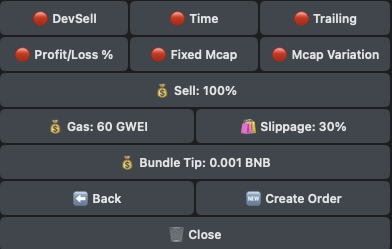
Configure the auto order parameters and tap Create Order to confirm.
| Button | Action |
| ---------------- | ------------------------------------------------------------------------------------------------------------------------------------------------------------------------------------------------------------------------------------------------------------------------------------------------------------------------------------------------------------------------------------------ |
| Dev Sell | Choose whether to automatically sell the specified amount if the Dev sells any of their tokens. If enabled, the bot will ignore the set profit/loss percentage and only trigger a sale when the Dev sells. |
| Time | Choose whether to buy after a specified timeframe. Bloom will execute the transaction after the timeframe you specify. |
| Trailing | A Trailing Stop Loss moves automatically as the token price increases. The Trailing Value (%) represents the distance between the current price and where the stop loss is set. As the token price rises, the stop loss moves up with it, always maintaining that distance. If the price drops enough to hit the trailing level, the order triggers and closes the position automatically. |
| Sell Amount | Set the % you would like to sell. |
| Profit/Loss | Set take profit or stop loss.
• 📈 Take Profit: Use positive values (e.g., +100% for 2x)
• 📉 Stop Loss: Use negative values (e.g., -50% for half)
|
| Gas | Set the transaction gas (Max Priority Fee) for selling.
Max Fee is automatically calculated using the formula: Base Fee + (Priority Fee × 2).
|
| Slippage | Set the buy slippage percentage. |
| Create Order | Tap to create the order. |
| Delete Order | Deletes the target order.
|
| {% endstep %} | |
| {% endstepper %} | |
---
# Agent Instructions
This documentation is published with GitBook. GitBook is the documentation platform designed so that both humans and AI agents can read, navigate, and reason over technical content effectively. Learn more at gitbook.com.
## Querying This Documentation
If you need additional information that is not directly available in this page, you can query the documentation dynamically by asking a question.
Perform an HTTP GET request on the current page URL with the `ask` query parameter, and the optional `goal` query parameter:
```
GET https://docs.bloombot.app/evm/evm-bot/settings/presets/spot-presets-auto-orders.md?ask=&goal=
```
`ask` is the immediate question: it should be specific, self-contained, and written in natural language.
`goal` is optional and describes the broader end goal you are ultimately trying to accomplish on behalf of the user. GitBook uses it to tailor the answer towards what is most useful for that goal.
The response will contain a direct answer to the question and relevant excerpts and sources from the documentation.
Use this mechanism when the answer is not explicitly present in the current page, you need clarification or additional context, or you want to retrieve related documentation sections.