> For the complete documentation index, see [llms.txt](https://docs.bloombot.app/llms.txt). Markdown versions of documentation pages are available by appending `.md` to page URLs; this page is available as [Markdown](https://docs.bloombot.app/manager/chrome-extension/scrapers/discord-scraper.md).
# Discord Scraper
{% hint style="info" %}
Discord AutoBuy runs AutoBuy inside a Discord Web tab. When a contract address is posted in the channel you are watching, the Extension fires a buy automatically using your Scrapers configuration.
{% endhint %}
***
### Requirements
Before starting Discord AutoBuy, make sure:
* The Bloom Extension is **installed and signed in**.
* Your **Scrapers** configuration is set in the Manager under Settings, Extension, Scrapers. Set the Auto Buy Amount, fees, tip, and filters.
* **Discord Web** is enabled in Sites.
* You are using **Discord Web** (discord.com) in Chrome. AutoBuy does not work in the Discord desktop app.
* Only **one Discord tab** is open in the current browser window.
***
### Starting AutoBuy
{% stepper %}
{% step %}
Open Discord Web (discord.com) in Chrome. Keep only one Discord tab in the current browser window.
{% endstep %}
{% step %}
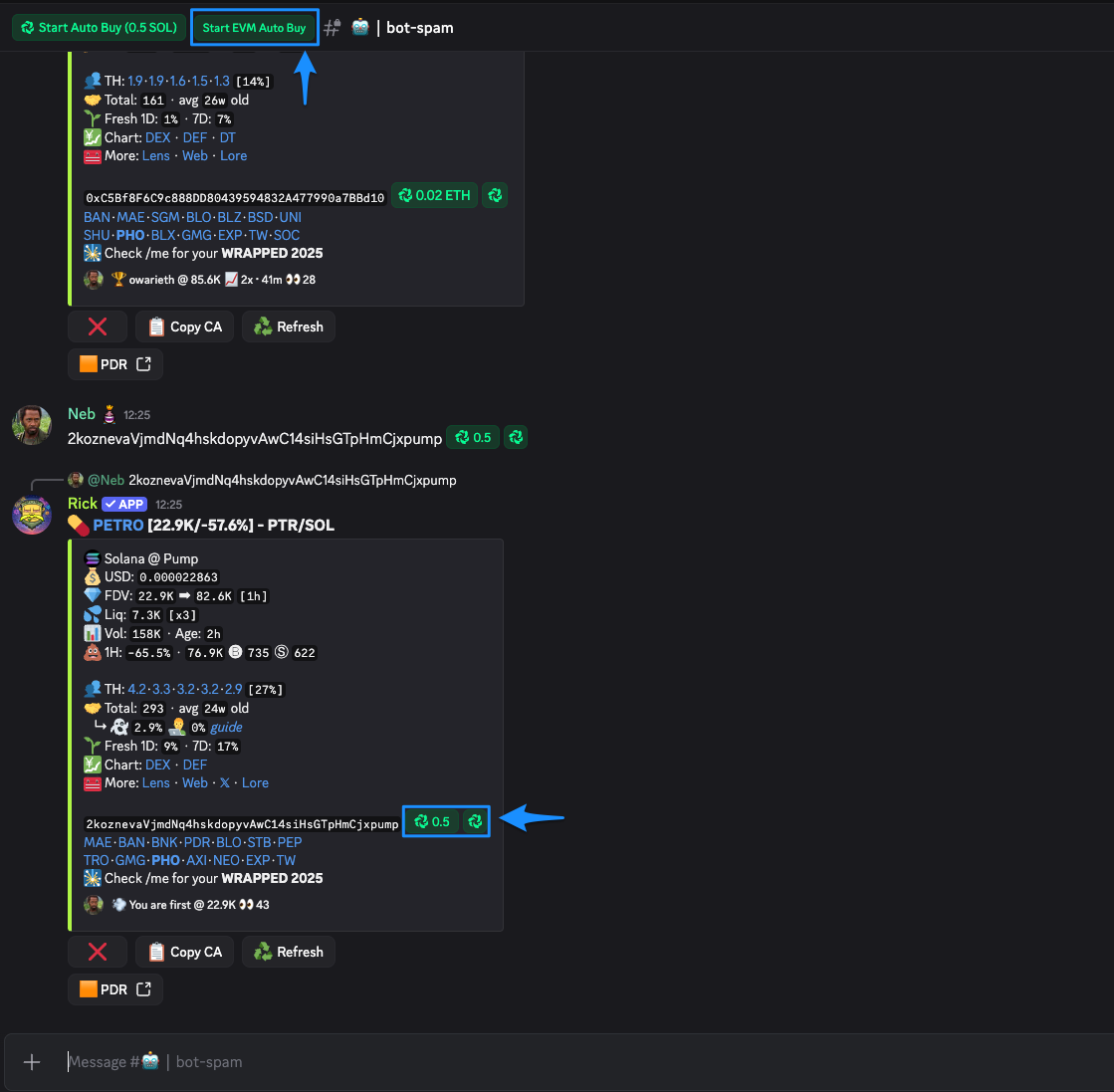
Navigate to the target channel and leave the tab active. The Extension injects a Bloom toolbar into the Discord interface.
{% endstep %}
{% step %}
Verify your Scrapers configuration in the Manager. Double-check the Auto Buy Amount, filters, and fees before going live.
{% endstep %}
{% step %}
Press the AutoBuy button injected into Discord. The button follows the chain selected in the Extension: Start SOL Auto Buy while Solana is selected, Start EVM Auto Buy while an EVM chain is selected.
Solana
EVM
{% endstep %}
{% endstepper %}
***
### What Happens Next
Once started, the Extension scans every new message in the active Discord channel for contract addresses.
* **Address detected** → Scrapers configuration applied → buy fired.
* **Filter fails** (market cap, liquidity, or "already bought") → buy skipped, scanning continues.
* **No address in the message** → ignored.
You can keep using Discord normally while AutoBuy runs. The Extension only reacts to contract addresses; regular messages, reactions, and voice calls are unaffected.
To stop AutoBuy, press the same button again (it toggles to Stop Auto Buy).
***
### Running Multiple Discord Tabs
How do I monitor more than one Discord channel at the same time?
Open each Discord tab in a **separate browser window**. One window, one Discord tab. Every window runs its own AutoBuy instance independently.
The limit is per window, not per browser profile, so you can open as many windows as your machine handles.
---
# Agent Instructions
This documentation is published with GitBook. GitBook is the documentation platform designed so that both humans and AI agents can read, navigate, and reason over technical content effectively. Learn more at gitbook.com.
## Querying This Documentation
If you need additional information that is not directly available in this page, you can query the documentation dynamically by asking a question.
Perform an HTTP GET request on the current page URL with the `ask` query parameter, and the optional `goal` query parameter:
```
GET https://docs.bloombot.app/manager/chrome-extension/scrapers/discord-scraper.md?ask=&goal=
```
`ask` is the immediate question: it should be specific, self-contained, and written in natural language.
`goal` is optional and describes the broader end goal you are ultimately trying to accomplish on behalf of the user. GitBook uses it to tailor the answer towards what is most useful for that goal.
The response will contain a direct answer to the question and relevant excerpts and sources from the documentation.
Use this mechanism when the answer is not explicitly present in the current page, you need clarification or additional context, or you want to retrieve related documentation sections.