> For the complete documentation index, see [llms.txt](https://docs.bloombot.app/llms.txt). Markdown versions of documentation pages are available by appending `.md` to page URLs; this page is available as [Markdown](https://docs.bloombot.app/manager/deploy/deploy.md).
# Deploy
{% hint style="info" %}
Deploy launches a new token on Solana from inside the Manager's Twitter Tracker. You pick a wallet, fill the modal, and click Deploy Token. The wallet you select in the header is the creator wallet. It signs the deploy and performs the first buy.
{% endhint %}
***
### Entry points
You can start a deploy from three places in the Twitter Tracker.
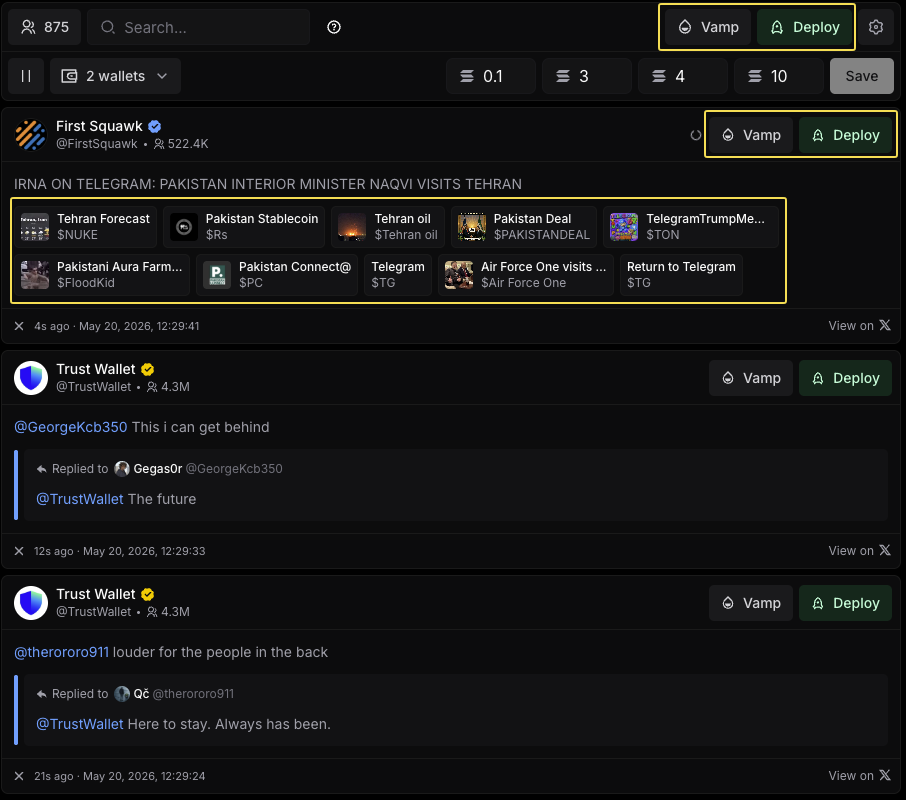
* Deploy button in the tracker top bar. Opens an empty modal.
* Deploy button on every tweet card. Prefills the modal with the tweet's Post URL and pulls the image from the tweet.
* Enrichment tile under a tweet. Prefills Token Name, Token Symbol, Post URL, and Token Image from the tile. Every field stays editable.
{% hint style="info" %}
Enrichment tiles appear only when Bloom's AI detects a token candidate in the post. See the Settings page for the position control and a fuller definition.
{% endhint %}
***
### The Deploy modal
The modal is one continuous flow from header to footer. Walk it top to bottom.
{% stepper %}
{% step %}
Pick a creator wallet from the header dropdown. This wallet signs the deploy and pays for the first buy.
{% endstep %}
{% step %}
Set the Token Name and the Token Symbol.
{% endstep %}
{% step %}
Confirm or paste the Post URL.
{% endstep %}
{% step %}
Choose a Token Image source: From Tweet, Library, or AI Generated.
{% endstep %}
{% step %}
Pick one or more launchpads. Each launchpad gear opens its own settings.
{% endstep %}
{% step %}
Configure Features. Apply or create a Bundle preset, and paste a vanity private key with Custom CA if you want one.
{% endstep %}
{% step %}
Set the creator buy SOL amount in the footer and the Priority Fee.
{% endstep %}
{% step %}
Click Deploy Token.
{% endstep %}
{% endstepper %}
The rest of this page expands each step, starting at the top of the modal.
#### From Tweet
Directly Deploy from a tweet by clicking or highlighting the text.
{% embed url="" %}
***
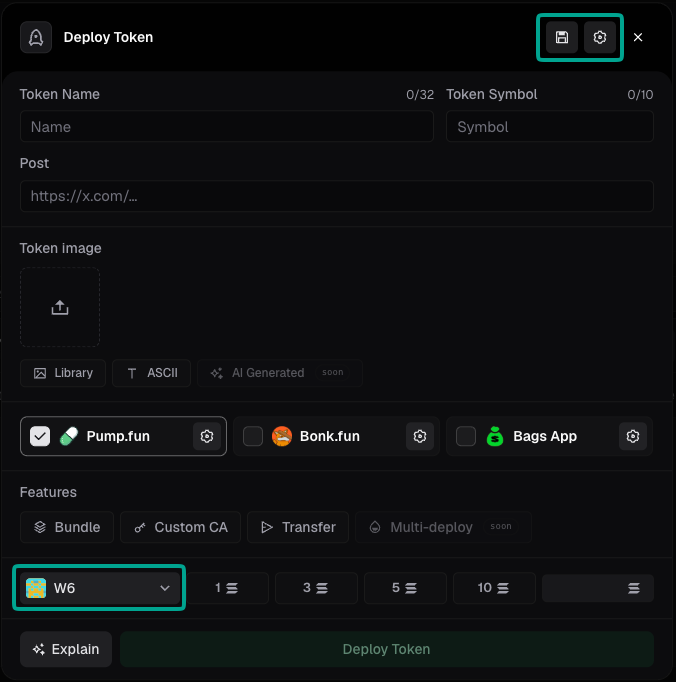
### Modal header icons
The header carries four functional icons, left to right.
{% tabs %}
{% tab title="Save preset" %}
The floppy disk icon saves the current modal configuration as a preset.
{% hint style="info" %}
A preset is a saved bundle of deploy settings. It captures launchpads, Bundle mode, Bundle Buys, Token Distribution, fees, and the rest of the modal state so you can reload it later without reconfiguring.
{% endhint %}
{% endtab %}
{% tab title="Load preset" %}
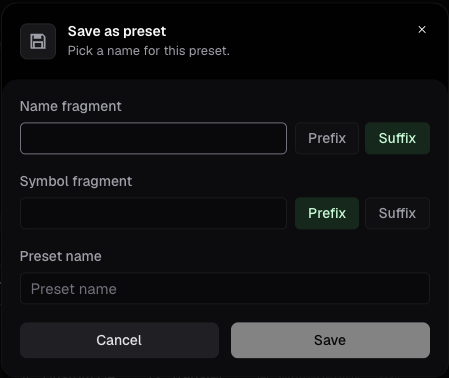
The archive icon loads a saved preset into the modal. Every field the preset covers fills in at once.
| Field | Description |
| ------------------- | ---------------------------------------------------------------------------------------------------------------------------------------------------------------------------------- |
| **Name fragment** | Text the preset adds to the token name. Prefix places it before the name you enter, Suffix places it after. If you enter no name, the fragment is the only name displayed. |
| **Symbol fragment** | Text the preset adds to the token symbol. Prefix places it before the symbol you enter, Suffix places it after. If you enter no symbol, the fragment is the only symbol displayed. |
| **Preset name** | Name of the preset. It is the label you pick from later, here and in the Deploy Preset dropdown in Settings. |
| {% endtab %} | |
{% tab title="Advanced settings" %}
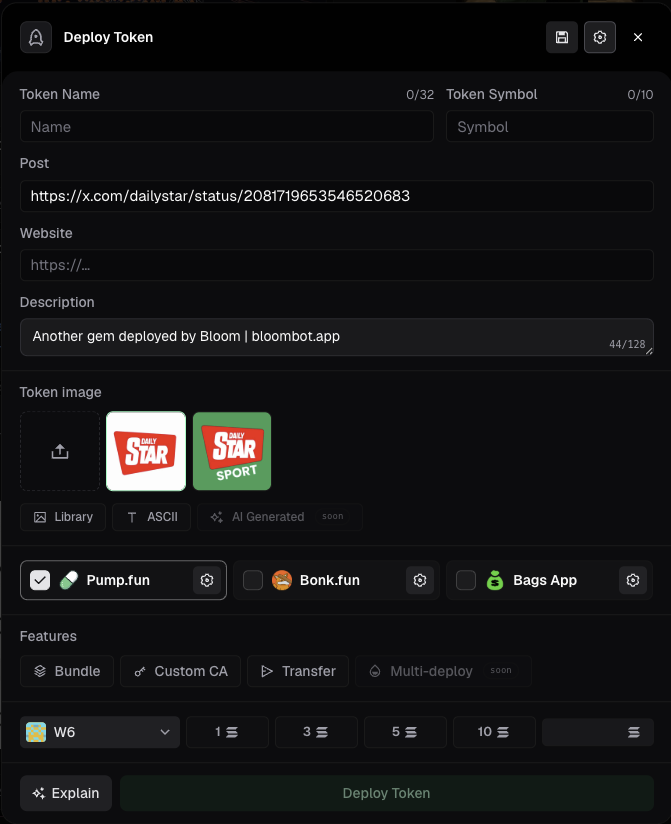
The gear icon toggles Website and Description as additional fields in the modal body.
Once enabled, both fields appear under the Post field.
{% endtab %}
{% tab title="Wallet selector" %}
The dropdown selects the creator wallet. The wallet you pick here signs the deploy transaction and performs the first buy at the SOL amount you set in the footer.
{% endtab %}
{% endtabs %}
***
### Modal fields
The body of the modal holds the metadata for your token.
| Field | Description |
| ---------------- | ------------------------------------------------------------------------ |
| **Token Name** | Up to 32 characters. |
| **Token Symbol** | Up to 10 characters. |
| **Post** | URL of the source tweet. Empty when you open the modal from the top bar. |
| **Website** | Optional. Appears after you toggle Advanced settings in the header. |
| **Description** | Optional. Appears after you toggle Advanced settings in the header. |
With Website and Description enabled, the modal looks like this.
***
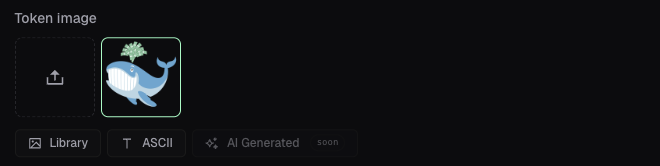
### Token Image
Pick where the image comes from. The three modes are mutually exclusive.
{% tabs %}
{% tab title="From Tweet" %}
Bloom's AI pulls images from the source tweet. The strip below the tabs shows the candidates. Empty when the deploy was not started from a tweet.
{% endtab %}
{% tab title="Library" %}
The set of images you have uploaded from your device. Click the upload tile to add a new one.
{% endtab %}
{% tab title="AI Generated" %}
Bloom generates a token image with AI using parameters consistent with the tweet, the coin, and existing launches on the chain.
{% endtab %}
{% endtabs %}
***
### Image editor (Studio)
Every image carries a pencil icon in the top-right corner. Click it to open Studio.
Inside Studio you can:
* Keep the image as it is or replace it.
* Crop the image.
* Apply a flat or a gradient color background.
* Apply templates such as bars or black and white.
* Add an emoji.
* Add custom text with selectable color and font.
Click Save to persist the change.
***
### Launchpads
Each launchpad has a checkbox and a gear icon. Toggle the checkbox to include or exclude the launchpad. Your token deploys to every launchpad that is active, in parallel, with the same Bundle preset applied to each.
The gear opens the per-launchpad settings.
{% tabs %}
{% tab title="Pump.fun" %}
The panel sets the quote token, the launch mode, and the fee split.
| Field | Description |
| ---------------- | --------------------------------------------------------------------------------------------------------------------------------------------------------------------------------------------------------------------------------------------------------------------- |
| **Quote** | SOL or USDC. The token used to pay rewards, creator fees, and buybacks. |
| **Mayhem Mode** | Adds 1 billion units to the supply, making 2 billion total. For 24 hours an AI agent trades the token on a random walk, with equal buy and sell probability. Protocol fees still apply. Opt-in at launch only. |
| **Mode** | **Cashback:** forgoes 100% of your creator-fee share and accrues it to traders proportional to their volume. Traders claim it on chain. Opt-in at launch only, permanently locked once set. **Charity:** donate a portion of your creator fees to verified charities. |
| **Fee Claimers** | Assign percentages to yourself (Creator) and up to 9 additional claimers. Add Fee Claimer adds a row. |
Three buttons fill the claimer rows for you.
| Mode | Description |
| ------------------ | -------------------------------------------------------- |
| **All to Creator** | Sets Creator to 100% and every claimer to 0%. |
| **Split Evenly** | Divides 100% evenly across Creator and all claimer rows. |
| **% +100%** | Fills the remaining gap so the rows total exactly 100%. |
The Total row has to reach 100%. Click Save to apply the settings.
{% endtab %}
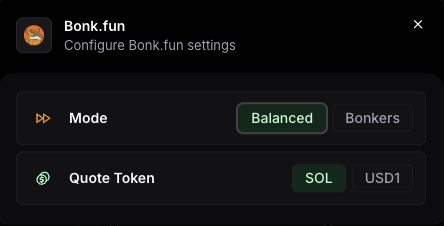
{% tab title="Bonk.fun" %}
Two segmented controls.
| Mode | Description |
| ------------ | --------------------------------------------------------------------------------------------------------------------------------------------------------------------------------- |
| **Balanced** | 0.75% of post-bonding swap volume deepens the liquidity pool. 0.25% routes to a 24-hour reward pool shared by creators who bonded in the same window. |
| **Bonkers** | Swap fees can drop up to 50% versus Balanced. 100% of your creator fees fund an automatic token buyback. All rewards, creator fees, and buybacks pay out in a single Quote Token. |
* **Quote Token**: The token that pays out rewards, creator fees, and buybacks under Bonkers. *SOL or USD1*.
{% endtab %}
{% tab title="Bags App" %}
| Fee Schedule | Pre-bonding | Post-bonding |
| ------------ | ----------- | ------------ |
| Flat 2% | 2% | 2% |
| 0.25% / 1% | 0.25% | 1% |
| 1% / 0.25% | 1% | 0.25% |
| 10% tax | 10% | 10% |
Pick a schedule, then assign percentages to yourself (Creator) and up to 100 additional Fee Claimers. Each claimer is a linked account on Solana, X, TikTok, Kick, Instagram, OnlyFans, or GitHub.
Configures how trading-fee revenue is split between you and other accounts.
| Mode | Descripti |
| ------------------ | -------------------------------------------------------- |
| **All to Creator** | Sets Creator to 100% and every claimer to 0%. |
| **Split Evenly** | Divides 100% evenly across Creator and all claimer rows. |
| **% +100%** | Fills the remaining gap so the rows total exactly 100%. |
The Apply button enables once the total reaches 100%.
{% endtab %}
{% endtabs %}
***
### Features
Four buttons sit under the launchpad row. Bundle, Custom CA, and Transfer are live. Multi-deploy is marked soon.
{% tabs %}
{% tab title="Bundle" %}
The Bundle button opens an inline picker of your saved presets. Pick one to apply it, or create a new preset from scratch.
A Bundle preset has four modes. Pick one when you create the preset.
**None**
The deploy runs alone. The creator wallet buys at the SOL amount set in the footer. No additional wallets buy at deploy.
Configure Token Distribution as a follow-up transfer from the creator wallet to other wallets.
***
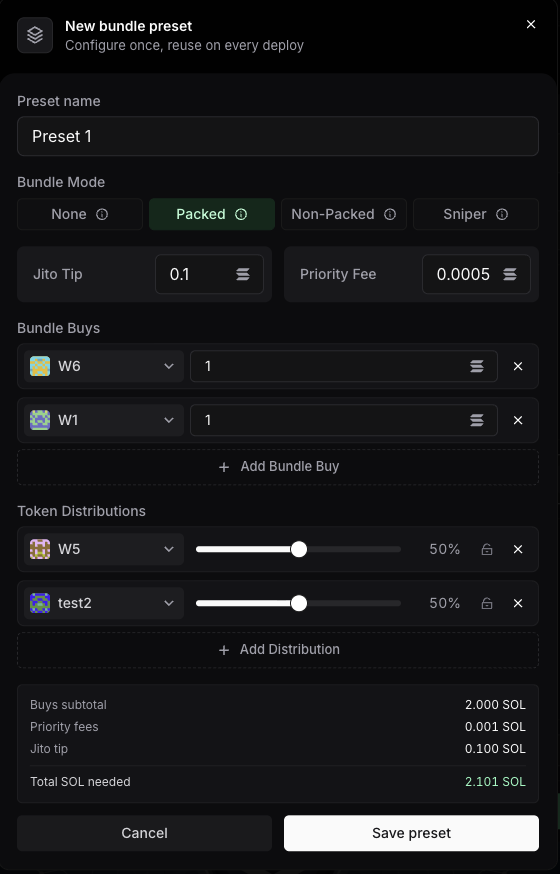
**Packed**
Multiple buys are packed into the same Jito bundle as the deploy. No other user can buy before you.
Configure:
* Jito Tip
* Priority Fee
* Bundle Buys (additional wallets and their SOL amounts)
* Token Distribution as a follow-up transfer from the creator wallet to other wallets
***
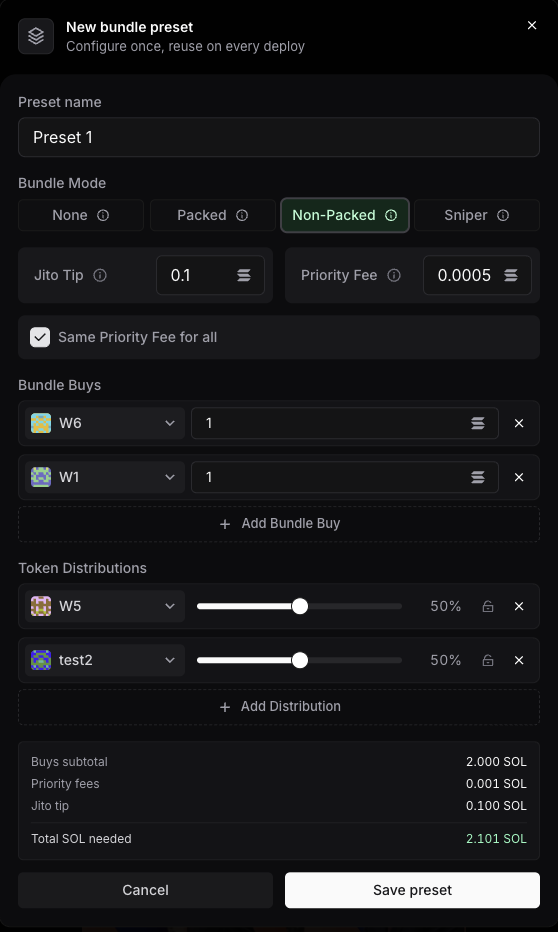
**Non-Packed**
Each Buy lands as its own transaction. All transactions land together at deploy, before any other user.
Configure:
* Jito Tip
* Priority Fee
* Same Priority Fee for all checkbox. *When the checkbox is off, you set a per-wallet fee on each Bundle Buy*
* Bundle Buys (additional wallets and their SOL amounts)
* Token Distribution as a follow-up transfer from the creator wallet to other wallets
***
**Sniper**
No bundle and no cap on wallets. Other users can buy before your snipe lands, in exchange for a supply distribution that looks organic.
Configure:
* Priority Fee
* Same Priority Fee for all checkbox.
* Bundle Buys (additional wallets and their SOL amounts)
* Token Distribution as a follow-up transfer from the creator wallet to other wallets
{% hint style="info" %}
The bottom of the Bundle preset modal shows a Summary block: Bundle Buys plus Priority Fees plus Jito Tip. None hides the Summary; the other three show it.
{% endhint %}
{% endtab %}
{% tab title="Custom CA" %}
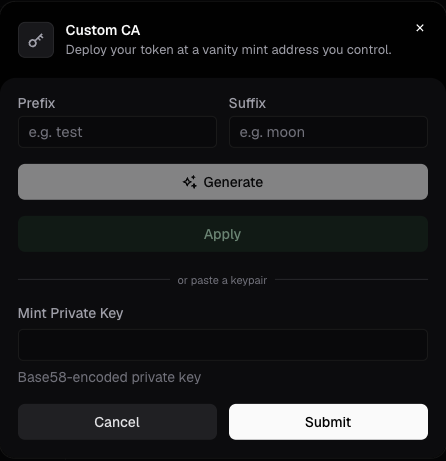
Custom CA deploys your token at a vanity mint address you control. Generate the keypair inside Bloom, or paste one you already have.
| Field | Description |
| -------------------- | -------------------------------------------------------------------------------------------------------------------------------------- |
| **Prefix** | Characters the mint address starts with. |
| **Suffix** | Characters the mint address ends with. |
| **Generate** | Bloom generates a vanity keypair with AI, matching the prefix and the suffix you set. Longer strings take longer to find. |
| **Apply** | Applies the generated keypair to the deploy. |
| **Mint Private Key** | Base58-encoded private key of a pre-generated vanity keypair. Paste it and click Submit. Bloom does not validate the key in the modal. |
{% hint style="info" %}
If you do not have your own vanity key, Bloom can supply a pre-generated one.
{% endhint %}
{% endtab %}
{% tab title="Transfer" %}
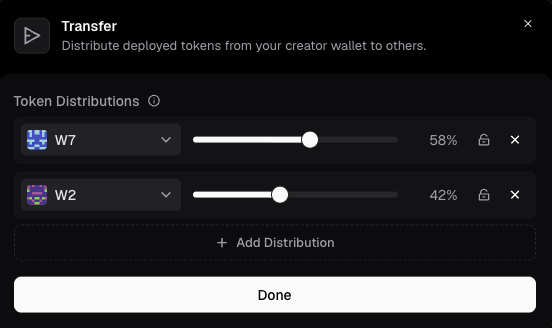
Distribute deployed tokens from your creator wallet to others.
Each Token Distributions row picks a wallet and its share of the distributed supply. Add Distribution adds a row. Click Done to save the split.
{% endtab %}
{% endtabs %}
***
### Set the buy amount and deploy
The footer is the last step.
Pick the SOL amount for the creator buy from four preset tiles: 1, 3, 5, or 10 SOL. Edit any of those four values with the pencil icon next to the row. Set the Priority Fee. Click Deploy Token.
***
### Explain
Explain sits next to Deploy Token in the footer. It uses AI to describe the configuration you have just built: how the task is set up, and how it will execute once you launch it.
---
# Agent Instructions
This documentation is published with GitBook. GitBook is the documentation platform designed so that both humans and AI agents can read, navigate, and reason over technical content effectively. Learn more at gitbook.com.
## Querying This Documentation
If you need additional information that is not directly available in this page, you can query the documentation dynamically by asking a question.
Perform an HTTP GET request on the current page URL with the `ask` query parameter, and the optional `goal` query parameter:
```
GET https://docs.bloombot.app/manager/deploy/deploy.md?ask=&goal=
```
`ask` is the immediate question: it should be specific, self-contained, and written in natural language.
`goal` is optional and describes the broader end goal you are ultimately trying to accomplish on behalf of the user. GitBook uses it to tailor the answer towards what is most useful for that goal.
The response will contain a direct answer to the question and relevant excerpts and sources from the documentation.
Use this mechanism when the answer is not explicitly present in the current page, you need clarification or additional context, or you want to retrieve related documentation sections.