> For the complete documentation index, see [llms.txt](https://docs.bloombot.app/llms.txt). Markdown versions of documentation pages are available by appending `.md` to page URLs; this page is available as [Markdown](https://docs.bloombot.app/manager/deploy/solana/settings.md).

# Settings

{% hint style="info" %}
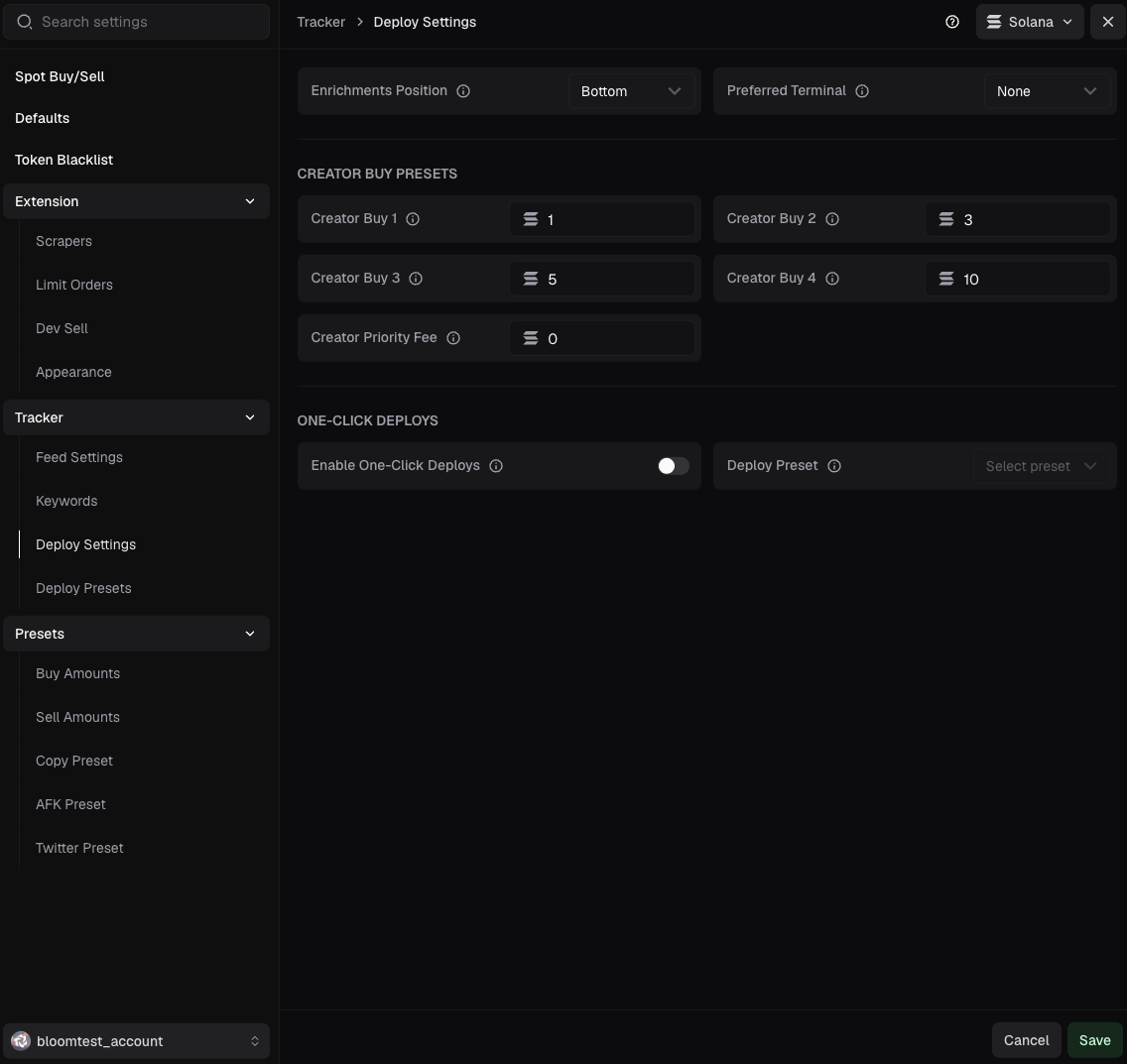
Settings is where every Dev Features preference lives: enrichment tiles, creator buy presets, and one-click deploys.
{% endhint %}

***

### Deploy Settings

<figure><img src="https://373591576-files.gitbook.io/~/files/v0/b/gitbook-x-prod.appspot.com/o/spaces%2FMnkwltEDWRRlh7lLk05b%2Fuploads%2FXBXcUMrG7g778OtkpvO0%2F20.png?alt=media&amp;token=a4d03b6c-2fdc-4adc-80e8-bbd97a51f50b" alt=""><figcaption></figcaption></figure>

<figure><img src="https://373591576-files.gitbook.io/~/files/v0/b/gitbook-x-prod.appspot.com/o/spaces%2FMnkwltEDWRRlh7lLk05b%2Fuploads%2FbjQ50TOxhbDOZSqPHOjL%2F11.png?alt=media&amp;token=84cf68a5-113f-4979-a81b-fbbb2b3e9bdb" alt=""><figcaption></figcaption></figure>

| Field                        | Description                                                                                                                                                                                                                                                                                                                                                                                                                                       |
| ---------------------------- | ------------------------------------------------------------------------------------------------------------------------------------------------------------------------------------------------------------------------------------------------------------------------------------------------------------------------------------------------------------------------------------------------------------------------------------------------- |
| **Enrichments Position**     | Where enrichment tiles render on a tweet card: Top, Bottom, Left, Right. Enrichment tiles are the rectangles that appear next to a tweet when Bloom's AI detects a token candidate in the post. Each tile carries a name, a symbol, and an image, derived from the tweet's text and the history of coins previously deployed on the chain selected at the top of the tracker. Clicking a tile opens the Deploy modal with those fields prefilled. |
| **Preferred Terminal**       | Which terminal to open when a token is successfully deployed.                                                                                                                                                                                                                                                                                                                                                                                     |
| **Creator Buy 1 to 4**       | Preset SOL amount for the creator-buy chip in the Deploy dialog. Four slots, each holding its own amount.                                                                                                                                                                                                                                                                                                                                         |
| **Creator Priority Fee**     | Priority fee in SOL applied to the creator buy when deploying a token.                                                                                                                                                                                                                                                                                                                                                                            |
| **Enable One-Click Deploys** | Deploy a token in a single click using a saved deploy preset.                                                                                                                                                                                                                                                                                                                                                                                     |
| **Deploy Preset**            | Which saved deploy preset to apply when deploying with one click.                                                                                                                                                                                                                                                                                                                                                                                 |

{% hint style="info" %}
Some tweets carry no tiles. When the AI returns no candidates, the strip stays empty and the position setting has no visible effect on that card.
{% endhint %}

***

### Deploy Presets

{% hint style="info" %}
Preset mechanics are documented on the Deploy page. This menu is the shortcut to edit them without opening a full deploy flow.
{% endhint %}

<figure><img src="https://373591576-files.gitbook.io/~/files/v0/b/gitbook-x-prod.appspot.com/o/spaces%2FMnkwltEDWRRlh7lLk05b%2Fuploads%2Fl7RkN1TeDfO3LGoYjVa2%2F21.png?alt=media&amp;token=3e730c9a-c23e-41ec-9a08-60fc1e3792c5" alt=""><figcaption></figcaption></figure>

| Field               | Description                                                                                                                                                             |
| ------------------- | ----------------------------------------------------------------------------------------------------------------------------------------------------------------------- |
| **Preset name**     | Name of the preset.                                                                                                                                                     |
| **Token name**      | Text you add to the name of the token you choose.                                                                                                                       |
| **Name position**   | Whether the Token name sits before or after the name you enter, through the Prefix and Suffix options. If you enter no name, the Token name is the only name displayed. |
| **Symbol**          | Short name you add to the symbol you choose. If you choose no symbol, this is the only one that appears.                                                                |
| **Symbol position** | Whether the Symbol sits before or after the symbol you enter, through the Prefix and Suffix options. If you enter no symbol, the Symbol is the only symbol displayed.   |

### Bundle presets

{% hint style="info" %}
Bundle presets are the bundles you saved from the Deploy dialog. You rename and remove them here; the wallets and the amounts stay editable where you built them.
{% endhint %}

<figure><img src="https://373591576-files.gitbook.io/~/files/v0/b/gitbook-x-prod.appspot.com/o/spaces%2FMnkwltEDWRRlh7lLk05b%2Fuploads%2F0xQy58QHHrFAI526zUNl%2F23.png?alt=media&amp;token=a2a74686-1d13-42a8-a045-6b235877dbe0" alt=""><figcaption></figcaption></figure>

| Element           | Description                                                                                                                          |
| ----------------- | ------------------------------------------------------------------------------------------------------------------------------------ |
| **Saved bundles** | Every bundle saved from the Deploy dialog, with the total count on the right.                                                        |
| **Bundle card**   | The name of the bundle and what it carries: bundle mode, number of buys, number of transfers, slippage, and the date you created it. |
| **Rename**        | Renames the bundle.                                                                                                                  |
| **Remove**        | Deletes the bundle. The red button next to Rename.                                                                                   |


---

# Agent Instructions
This documentation is published with GitBook. GitBook is the documentation platform designed so that both humans and AI agents can read, navigate, and reason over technical content effectively. Learn more at gitbook.com.

## Querying This Documentation
If you need additional information that is not directly available in this page, you can query the documentation by asking a question.

Perform an HTTP GET request on the following URL with the `ask` and `goal` query parameters:

```
GET https://docs.bloombot.app/manager/deploy/solana/settings.md?ask=<question>&goal=<user_goal>
```

`ask` is the immediate question: it should be specific, self-contained, and written in natural language.
`goal` is what the user is ultimately trying to achieve, the reason they need the answer. Sharing it helps GitBook give you a better, more relevant answer. A goal is most helpful when it describes the outcome the user wants rather than restating the question. For example, with `ask=how do I create an API token`, a goal like `automate deployments from our CI pipeline` lets GitBook tailor the answer to that use case.

The response will contain a direct answer to the question and relevant excerpts and sources from the documentation.

Use this mechanism when the answer is not explicitly present in the current page, you need clarification or additional context, or you want to retrieve related documentation sections.